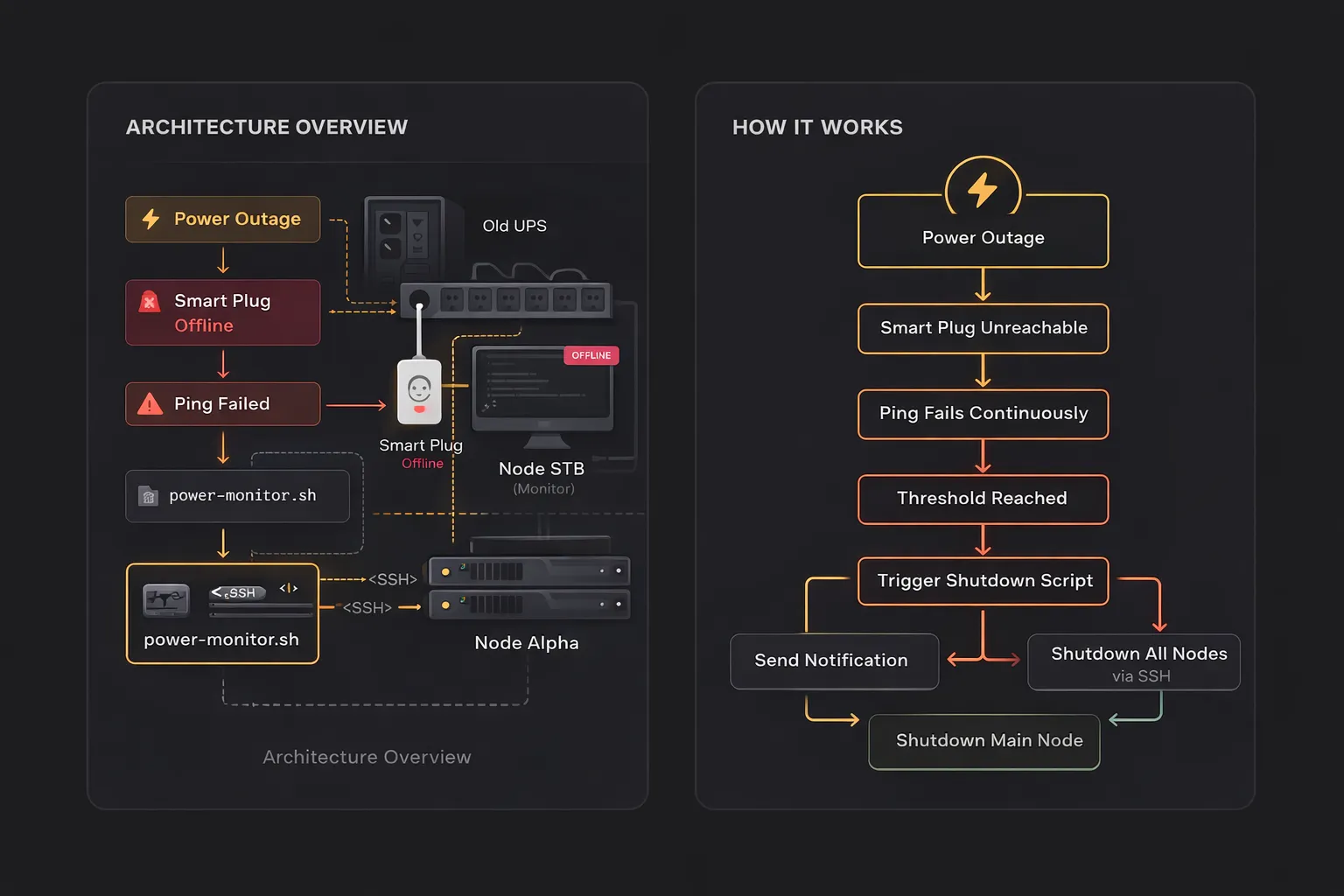
If you are running a homelab server using old hardware and an aging UPS, you’ve probably run into a common problem: power outages without a proper shutdown signal. While the UPS can keep your server alive for a short time, it often can’t communicate with the system to trigger a safe shutdown. This can lead to sudden power cuts, risking data corruption and unstable services. In this post, I’ll share a simple workaround using a smart plug to achieve a graceful shutdown without needing to upgrade your UPS.
The Problem: My UPS Can’t Signal Shutdown
I do have a UPS in my setup, but it’s an old model. Still works for backup power, but it has one major limitation:
- It cannot send a shutdown signal to the server
- No USB / network interface
- No communication ports at all, just basic power output
so when power goes out, the UPS keeps the server running temporarily, but when the battery runs out it will cut the power to my server and that is dangerous.
Why This Is a Serious Problem
Without a proper shutdown signal, the databases can get corrupted, docker containers may stop abruptly, filesystem integrity is at risk. Even though we had a UPS, we still didn’t have safe shutdown for all our homelab server.
The Workaround: Smart Plug as a Trigger
Since my UPS couldn’t communicate with the server, I needed to find another approach. I couldn’t rely on the UPS itself, as it only provides power without any signaling capability. So instead, I used a smart plug as a trigger mechanism. The idea is simple:
- The homelab server and network devices are powered by a UPS
- A script continuously pings the smart plug
- If the smart plug becomes unreachable for a certain period, it indicates a power outage
- The system then triggers a graceful shutdown across all nodes via SSH
Why Not Just Upgrade the UPS?
Upgrading to a modern UPS would easily solve this problem. However:
- it can be expensive
- my current UPS still works perfectly fine for backup power
- I only need a shutdown trigger
So this solution is simpler, cheaper, and good enough for my needs.
Implementation
1. Setup SSH Config file
we need to set this alias so we can easily create ssh connection to other homelab machine just using ssh <alias>
open ~/.ssh/config by nano ~/.ssh/config
add the configuration
Host <ALIAS>
    HostName <NODEA_LOCAL_IP_HERE>
    User <USER HERE>

Host <ALIAS>
    HostName <NODEB_LOCAL_IP_HERE>
    User <USER HERE>
run
ssh-copy-id <your_alias>
Now with the ssh configured, we can easily connect to other machines just by this command ssh <ALIAS>
2. Script Power Monitor
create a new file:
nano /opt/power-monitor.sh
then copy this code below
#!/bin/bash

SMARTPLUG_IP=""

BOT_TOKEN=""
CHAT_ID=""
MESSAGE_THREAD_ID=""

FAIL_COUNT=0
TRIGGERED=0
THRESHOLD=60   # seconds (ping failed)
DELAY=30       # delay before shutdown (seconds)

send_telegram() {
  MESSAGE="$1"

  # Send telegram notification
  curl -s -X POST "https://api.telegram.org/bot$BOT_TOKEN/sendMessage" \
    -d chat_id="$CHAT_ID" \
    -d message_thread_id="$MESSAGE_THREAD_ID" \
    -d text="$MESSAGE" > /dev/null

  # log
  logger -t power-monitor "$MESSAGE"
}

shutdown_node() {
  NODE=$1

  send_telegram "🔻 Shutting down $NODE..."

  SUCCESS=0

  for i in 1 2; do
    ssh -o ConnectTimeout=5 -o BatchMode=yes $NODE "
      /usr/bin/docker ps -q | xargs -r /usr/bin/docker stop
      sleep 5
      sudo /sbin/shutdown -h now
    " && SUCCESS=1 && break

    sleep 2
  done

  if [ "$SUCCESS" == "1" ]; then
    send_telegram "✅ $NODE shutdown command sent"
  else
    send_telegram "❌ $NODE unreachable / failed"
  fi
}

while true; do
  if ping -c 1 -W 1 $SMARTPLUG_IP > /dev/null; then
    FAIL_COUNT=0
  else
    FAIL_COUNT=$((FAIL_COUNT+1))
    logger -t power-monitor "Ping to $SMARTPLUG_IP failed ($FAIL_COUNT/$THRESHOLD)"
  fi

  if [ "$FAIL_COUNT" -ge "$THRESHOLD" ] && [ "$TRIGGERED" -eq 0 ]; then
    TRIGGERED=1

    send_telegram "⚡ Smart plug unreachable → power loss! (shutdown in ${DELAY} seconds)"

    sleep $DELAY

    # Parallel shutdown
    shutdown_node "alpha" &
    shutdown_node "bravo" &
    wait

    send_telegram "🛑 Shutting down STB..."
    shutdown -h now
  fi

  sleep 1
done
In the script, we use telegram bot to send notification while power loss happens. You can create your own, but I will not explain it here (wait for other post for this). I am running my homelab server with 3 nodes, STB, Alpha and Bravo, where this script lives in STB node. If you have only one node, then you can easily modify the code, right?
3. Give permission
give the permission to execute
chmod +x /opt/power-monitor.sh
4. Run as Service
create a new file
sudo nano /etc/systemd/system/power-monitor.service
then copy the code
[Unit]
Description=Power Monitor
After=network.target

[Service]
ExecStart=/opt/power-monitor.sh
Restart=always
RestartSec=5

[Install]
WantedBy=multi-user.target
5. Enable
sudo systemctl daemon-reexec
sudo systemctl enable power-monitor
sudo systemctl start power-monitor
How It Works
- A power outage occurs
- The smart plug goes offline
- The server continues running on UPS power
- The monitoring script detects that the smart plug is unreachable
- After reaching a failure threshold, the script:
- Sends shutdown commands to other nodes via SSH
- Shuts down the main node
Conclusion
Even with an old UPS, you can still achieve a safe and controlled shutdown process. You don’t always need expensive upgrades. Sometimes, a simple workaround like using a smart plug can significantly improve the reliability of your homelab.
If you’re running a similar setup, this approach might save your system from unexpected data loss.